Before You Start
WordPress Plan Requirement
To embed custom code, your WordPress setup must support:
Custom HTML blocks
Plugins or custom scripts (for some hosted plans)
If you’re using WordPress.com, you may need a plan that allows custom code.
If you’re using WordPress.org (self-hosted), custom HTML blocks are available by default.
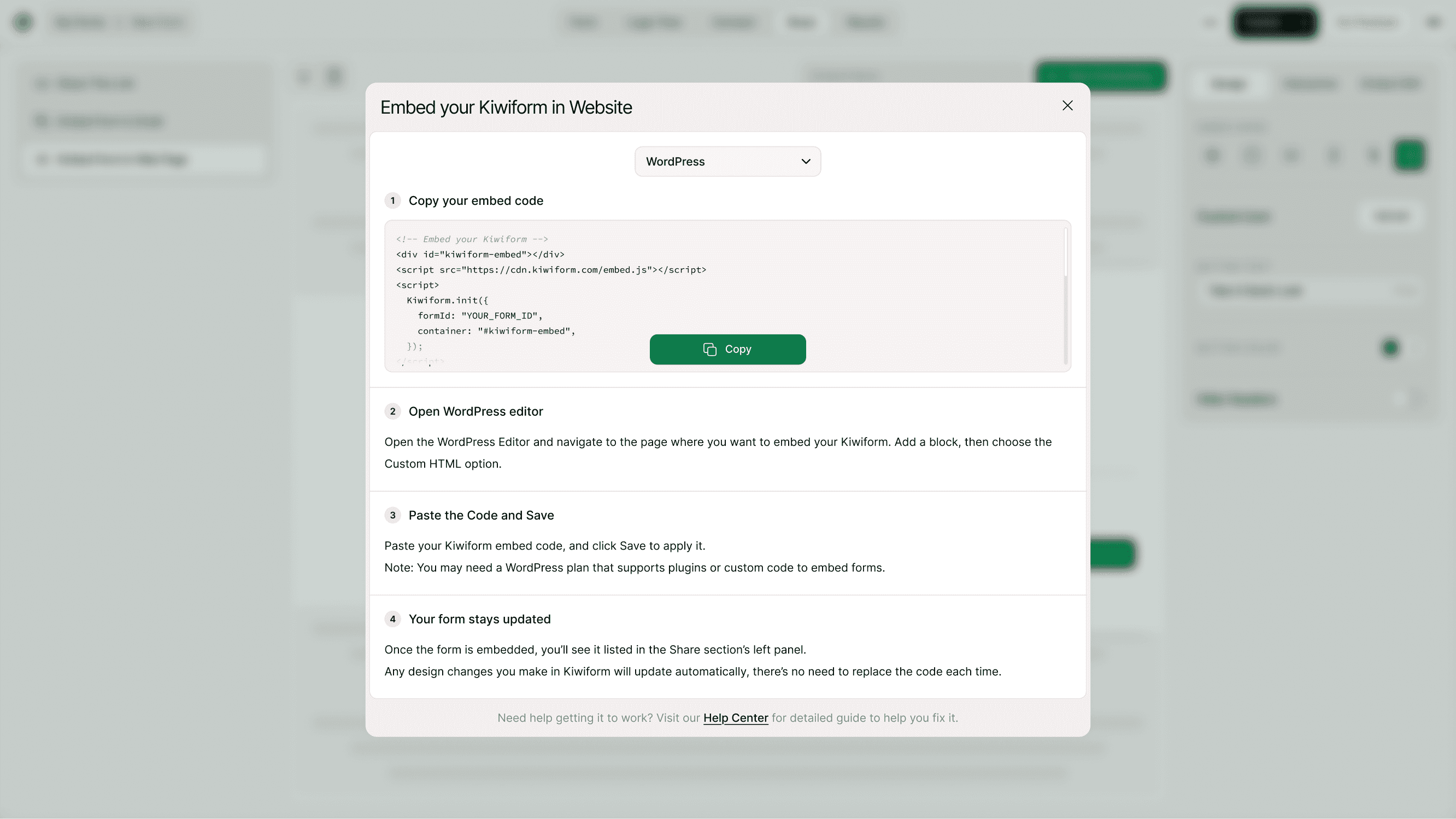
Open Share → Embed Form in Web Page
Open your form in Kiwiform
Click Share
Select Embed Form in Web page
Choose WordPress from the dropdown
Kiwiform will generate the correct Universal Embed code.
Copy Your Embed Code
Click Copy Code.
This script loads your form dynamically.
Open the WordPress Editor
Log in to your WordPress Dashboard
Go to Pages or Posts
Open the page where you want to embed the form
Click Edit
Paste the Code and Save
Paste your Kiwiform embed code into the Custom HTML block
Click Update or Publish
Your form will now appear on your WordPress page.
Your Form Updates Automatically
Once embedded:
Form edits in Kiwiform
Design changes
New questions
Logic flow updates
Will automatically reflect on your WordPress site.
You do not need to re-copy the code each time.
Where to Use WordPress Embed
You can embed Kiwiform in:
Landing pages
Blog posts
Contact pages
Sales pages
Checkout thank-you pages
Sidebar widgets (if HTML is allowed)
For best results, place the form in a full-width section for better responsiveness.
Why Use Kiwiform with WordPress?
WordPress powers millions of websites. Kiwiform adds:
Modern, distraction-free forms
Conditional logic
Fast loading
Mobile optimization
Seamless embedding
As a free Typeform alternative, Kiwiform gives WordPress users powerful form functionality without complexity.
Best Practices for Higher Conversions
Add a compelling headline above your form
Use short, focused forms
Avoid too many required fields
Place forms above the fold
Test responsiveness on mobile
A well-placed embedded form converts better than a simple link redirect.
Summary
To embed Kiwiform in WordPress, select WordPress in the Embed section, copy the Universal Embed code, add a Custom HTML block in your WordPress editor, paste the code, and publish. Your form will load dynamically and update automatically.