Changelog

Stay updated with the latest features, improvements, and product updates in Kiwiform. Each release highlights what's new and what's improved to help you build better forms.

You can now connect your Discord server to Kiwiform and automatically receive notifications whenever someone submits your form—without manually checking responses or dashboards.

Once connected, Kiwiform can send submission alerts directly to your selected Discord channels using webhooks. This helps teams, communities, moderators, and administrators stay informed about new activity in real time and respond faster when action is needed.

This makes it easier to manage workflows that involve lead collection, event registrations, community applications, support requests, feedback submissions, and internal processes. Instead of monitoring forms manually, your team can receive important updates directly inside Discord where collaboration already happens.

You can manage the integration anytime by updating webhook settings, changing notification channels, or testing notification delivery to ensure everything is working as expected.

Connect Discord and receive real-time notifications for every form submission.
You can now connect your Amazon S3 account to Kiwiform and automatically store uploaded files and form submission data in your AWS environment—without manual downloads, transfers, or file management.

Once connected, you can configure where files are stored by selecting your S3 bucket and organizing uploads based on your storage requirements. Every new submission is processed automatically, helping keep files structured, accessible, and easy to manage at scale.

This makes it easier to support workflows that involve document collection, applications, onboarding processes, registrations, file uploads, and operational requests. Your submission files are not just collected—they're automatically stored within your existing AWS infrastructure.

You can manage the integration anytime by updating connection settings, changing storage destinations, or monitoring upload activity.

Connect Amazon S3 and automate file storage for your forms.

make and kiwiform logo image


You can now connect your Make (formerly Integromat) account to Kiwiform and automatically send form submissions to your existing workflows, tools, and business systems—without manual exports or repetitive data entry.

Once connected, you can use Make scenarios to route form data, trigger actions, update records, send notifications, create tasks, and connect Kiwiform with the apps your team already relies on. Every submission can automatically flow through your configured workflows in real time.

This makes it easier to automate lead management, onboarding processes, approvals, notifications, CRM updates, spreadsheet workflows, and other operational tasks. Your form responses are not just collected—they become part of a connected workflow ecosystem.

You can manage the integration anytime by updating connections, configuring scenarios, or monitoring workflow activity directly within Make.

Connect Make and automate your form workflows.

You can now securely connect your Gmail and Outlook accounts directly inside Kiwiform using OAuth authentication, making email setup faster and easier without relying on custom app passwords or manual SMTP configuration.

Emails are now delivered through the official Gmail and Microsoft Graph APIs, helping improve reliability and deliverability for auto-responder workflows and email-based form interactions.

We’ve also improved account management by organizing SMTP, Gmail, and Outlook connections into separate sections inside account settings for better visibility and easier management.

Connected accounts can now be selected directly from the email auto-responder settings inside forms, making it easier to configure dynamic email workflows using your preferred email provider.

Connect Gmail or Outlook and simplify your email workflows.

Kiwiform now supports 43 global languages, including major European, Asian, and Middle Eastern languages, helping you create forms for a broader international audience.

  • We’ve also introduced full RTL (Right-to-Left) compatibility for languages such as Arabic, Hebrew, Persian, Urdu, Pashto, and Kurdish. Form layouts, navigation controls, alignment, and UI direction now automatically adapt based on the selected language for a more natural respondent experience.

  • Localization has also been improved across placeholders, validation messages, consent screens, and thank you pages to ensure a more consistent and accurate multilingual experience throughout the form flow.

  • Users can switch languages instantly within public forms, with seamless UI updates and responsive layout behavior across supported languages.

Create multilingual forms with full RTL support and localized experiences.

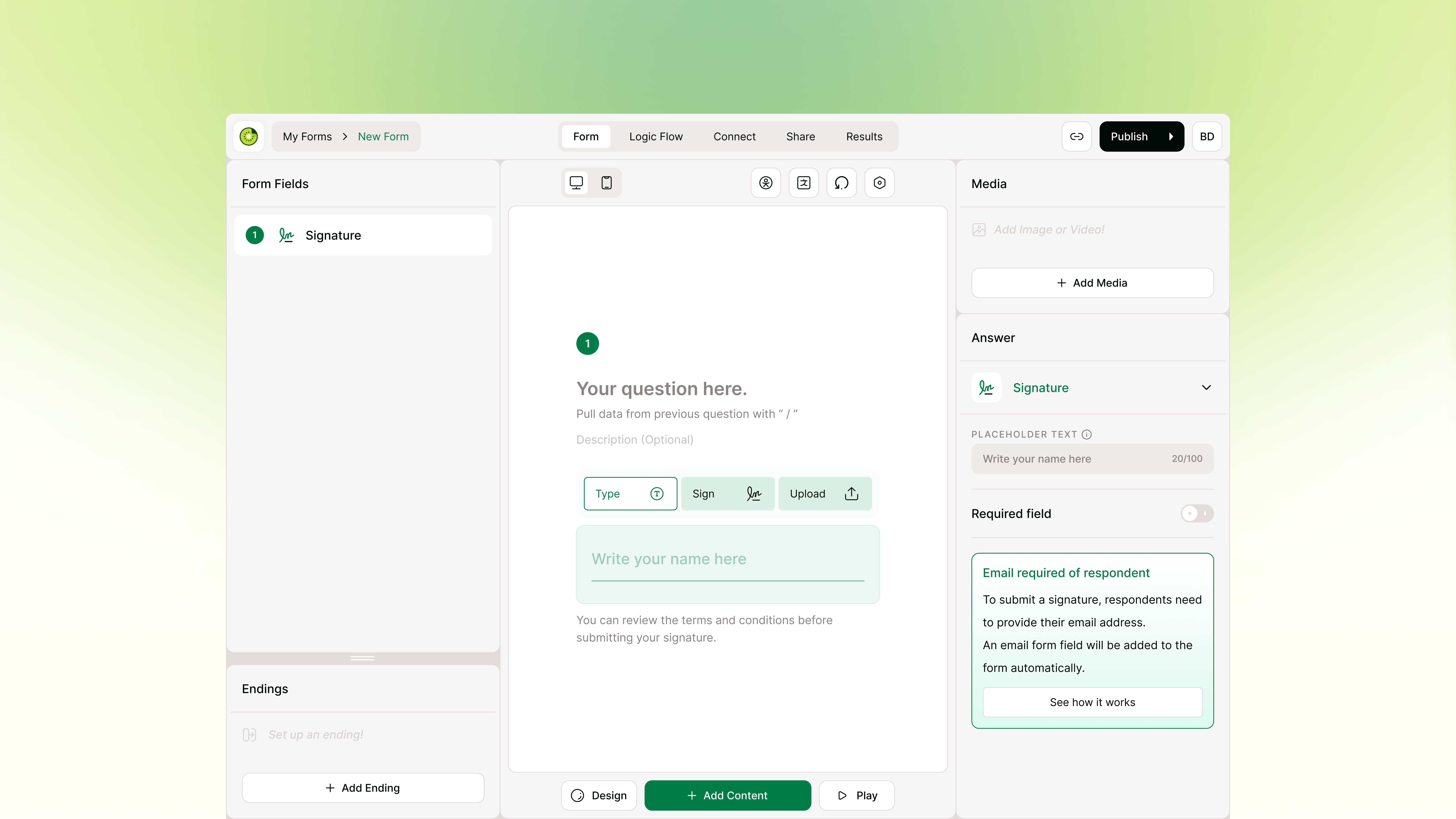
Signature Form Field image

You can now collect electronic signatures directly inside Kiwiform using the new Signature form field. Respondents can complete signing without leaving the form experience, helping create smoother approval, consent, and authorization workflows.

The Signature field supports multiple signing methods, including typing a signature, drawing a signature, or uploading a signature image. This creates a more flexible signing experience across desktop, mobile, and touch-enabled devices.

To support a more structured and traceable signing process, Kiwiform automatically requires an email address before a signature can be submitted. If an Email field does not already exist in the form, Kiwiform adds one automatically as part of the workflow.

The signing experience also includes a guided review and submit flow with consent acknowledgment before final submission, helping create clearer confirmation and approval experiences directly inside forms.

The Signature field works naturally with Legal Text, Consent Checkbox, Logic Flow, Endings, and multi-step form workflows, making it easier to build integrated signing and approval experiences inside Kiwiform.

Collect signatures directly inside your forms with the Signature field.

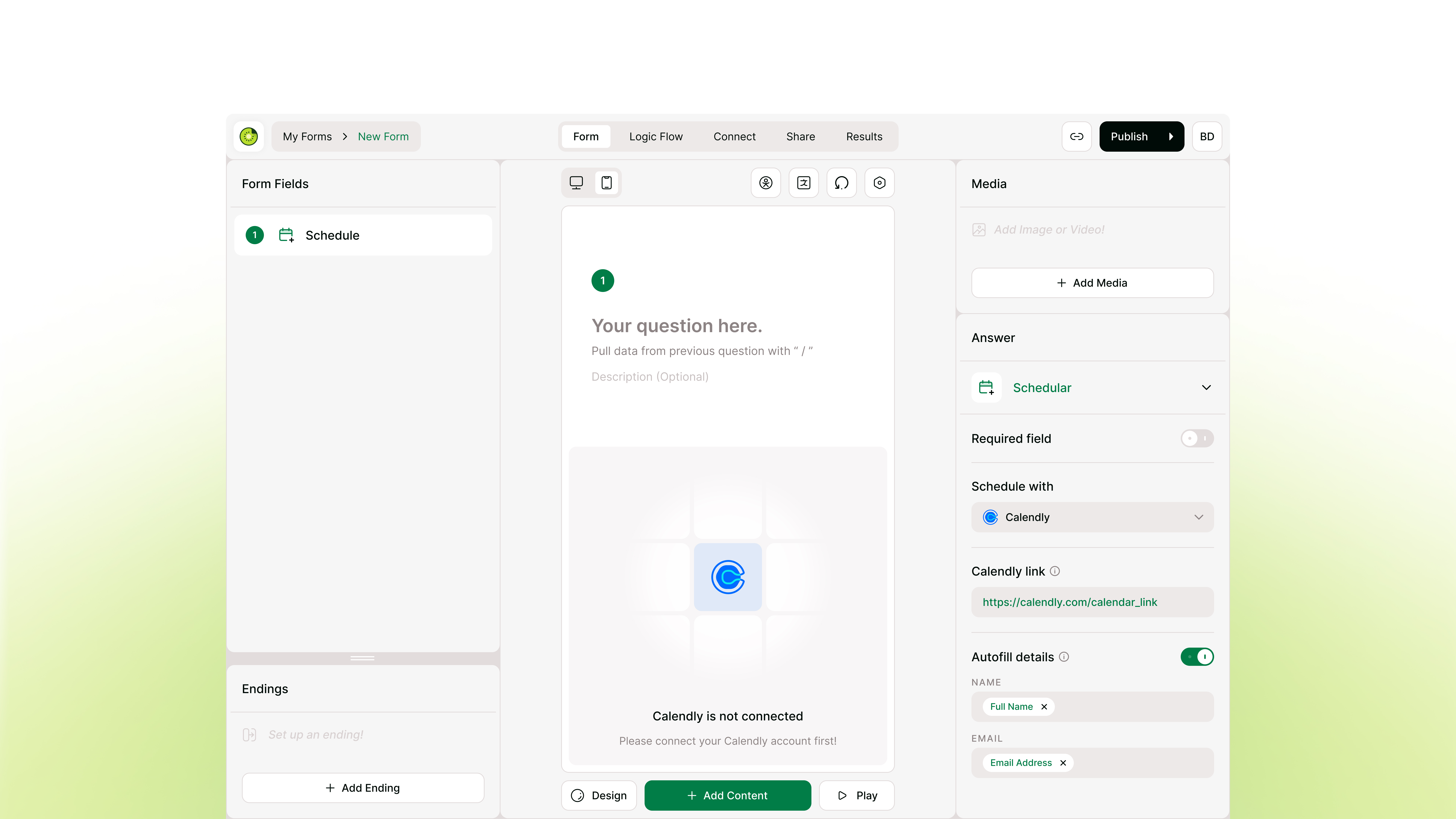
Scheduler Form Field image

You can now add a Scheduler form field to your Kiwiform forms and let respondents schedule meetings without leaving the form experience.

The Scheduler field supports Calendly and allows you to embed meeting selection directly into your form flow. Respondents can choose a time slot, complete scheduling, and submit the form in one seamless experience.

You can configure the Scheduler field from the Answer Panel by adding your Calendly link and optionally enabling autofill for respondent details. When autofill is enabled, Kiwiform can automatically pass mapped Name and Email fields into Calendly, reducing repetitive input and creating a faster booking experience.

This update helps transform forms into complete booking workflows, making it easier to capture leads, schedule consultations, run demos, manage onboarding, and streamline appointment-based interactions.

The embedded scheduling experience keeps respondents inside the form flow, reducing friction and improving completion rates.

Add scheduling directly inside your forms with the Scheduler field.

This update focuses on improving the reliability and consistency of integrations and data handling in Kiwiform.

  • We’ve made updates to the webhook JSON format to ensure more consistent and structured data delivery. This improves compatibility and makes it easier to work with webhook payloads in external systems.

  • We’ve also fixed issues in Google Sheets and Zapier integrations to ensure smoother data syncing and more reliable automation workflows.

  • These updates help ensure your data flows correctly across connected tools, making integrations more stable and dependable.

Explore improved integrations and data workflows.

dropbox intigration image

You can now connect your Dropbox account to Kiwiform and automatically store form submissions, uploaded files, and generated PDFs—without manual downloads or file handling.

Once connected, you can configure how your data is organized by selecting folders, enabling subfolders for each submission, and choosing what gets saved. Every submission is then stored in real time, keeping your data structured, accessible, and easy to manage.

This makes it easier to handle workflows that involve file collection, applications, or ongoing data tracking. Your submissions are not just collected—they’re automatically organized and ready to use.

You can manage the integration anytime by updating settings, reconnecting your account, or monitoring activity through logs.

Connect Dropbox and streamline your form data workflow.

video oudio field image

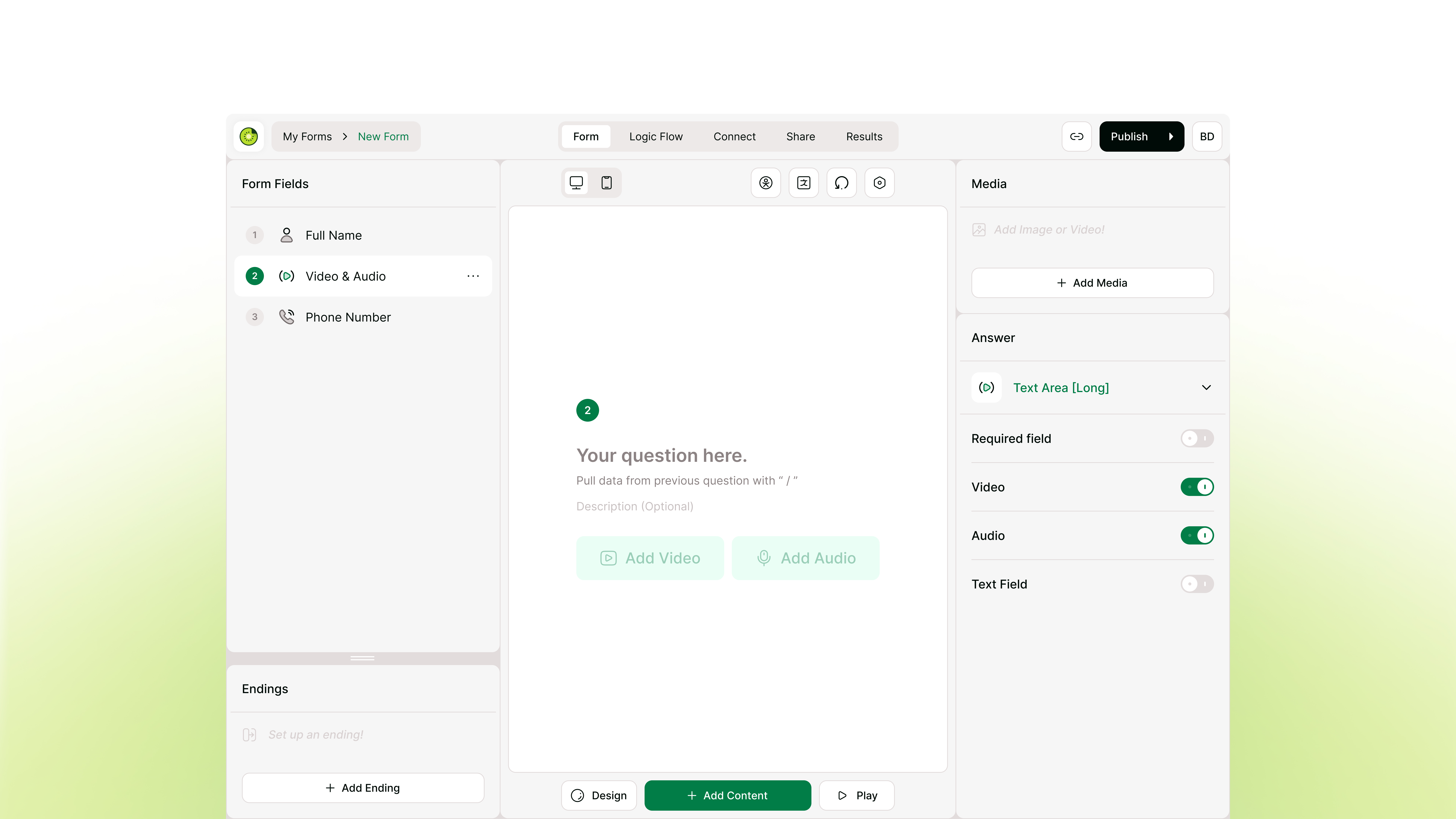
You can now add the Video & Audio form field to your forms, giving respondents the ability to record their answers directly from their browser or mobile device. Instead of relying solely on typed text, you can collect richer context, expressive feedback, and detailed explanations that text alone might miss.

This feature removes the need for respondents to record media on separate software and upload files manually. They simply click record and speak. Once submitted, the video and audio responses are saved alongside the rest of your data in your dashboard, keeping everything organized and easy to review in one place.

This update is particularly useful for collecting user testimonials, managing asynchronous interviews, or gathering in-depth qualitative feedback to complement a quantitative survey. It makes your forms more interactive while reducing the effort required from your respondents.

Collect expressive responses with the Video & Audio form field.

logic board walkthrough

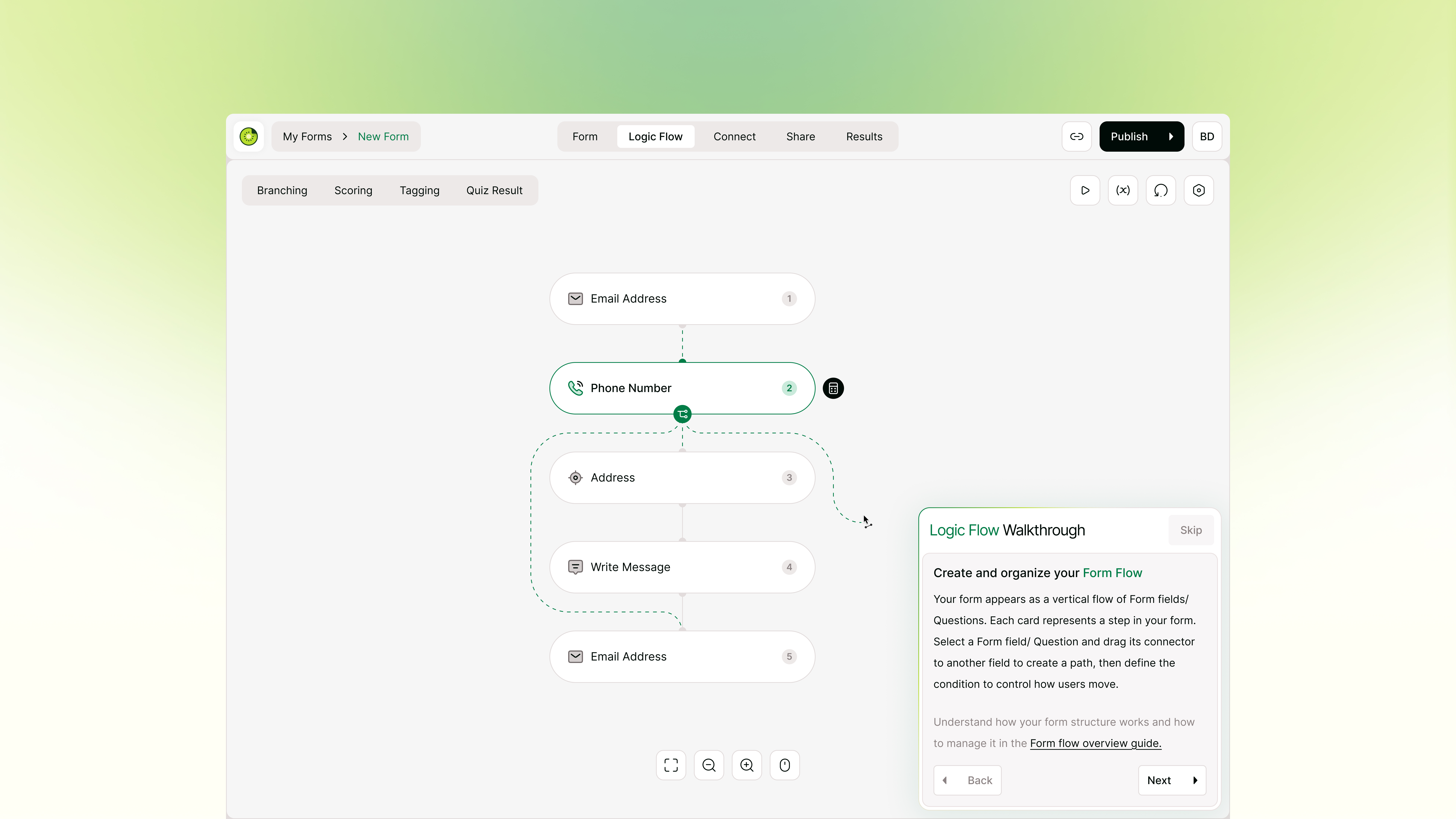
You can now learn how to structure dynamic forms right inside the builder with the new Logic Flow walkthrough. When you open the Logic Flow interface for the first time, a step-by-step tutorial will introduce you to the layout and core features of the Logic Board.

We’ve introduced a guided walkthrough in Logic Flow to help you how to map paths on your own, the walkthrough guides you through the core actions. You will learn how to connect one form field to another, set up branching conditions to guide respondents, and use advanced tools like scoring and tagging. It also covers how to display personalized outcomes, which is highly useful when building a quantitative survey or quiz.

The tutorial is designed to be lightweight, focusing on one concept at a time so you can take action immediately. Each step includes a contextual link to the Help Center if you want to explore deeper documentation. You can complete the guide at your own pace, skip it entirely, or replay it whenever you need a refresher.

Build a tailored respondent journey with Logic Flow.

You can now add placeholder text to supported form fields in Kiwiform to help respondents understand what kind of information is expected before they start typing.

  • Placeholder text appears inside the input field and disappears as soon as the respondent enters a value. It can be used to show examples, hints, or expected formats such as names, email addresses, phone numbers, URLs, and more.

  • This update helps make forms easier to understand, reduces confusion, and improves the quality of responses by giving respondents clearer guidance directly inside the field.

  • Placeholder text is available for text-based input fields and can be customized from the field settings inside the form builder.

Add clearer guidance to your form fields with placeholder text.

This update focuses on improving the experience for form creators across Logic Flow, Workspace collaboration, and form-building workflows.

  • Fixed several issues in Logic Flow and improved the Logic Board experience to make building, managing, and understanding form paths easier and more reliable. We’ve also improved support for forms with multiple endings, helping creators build clearer flows for different respondent outcomes.

  • Workspace collaboration has been enhanced with improvements to member management and the overall experience of inviting and working with team members inside shared workspaces.

  • Updates and fixes to Design & Themes to improve branded forms and create a more polished, consistent experience for respondents across different form styles.

Explore the latest improvements across form building, collaboration, and branded forms.

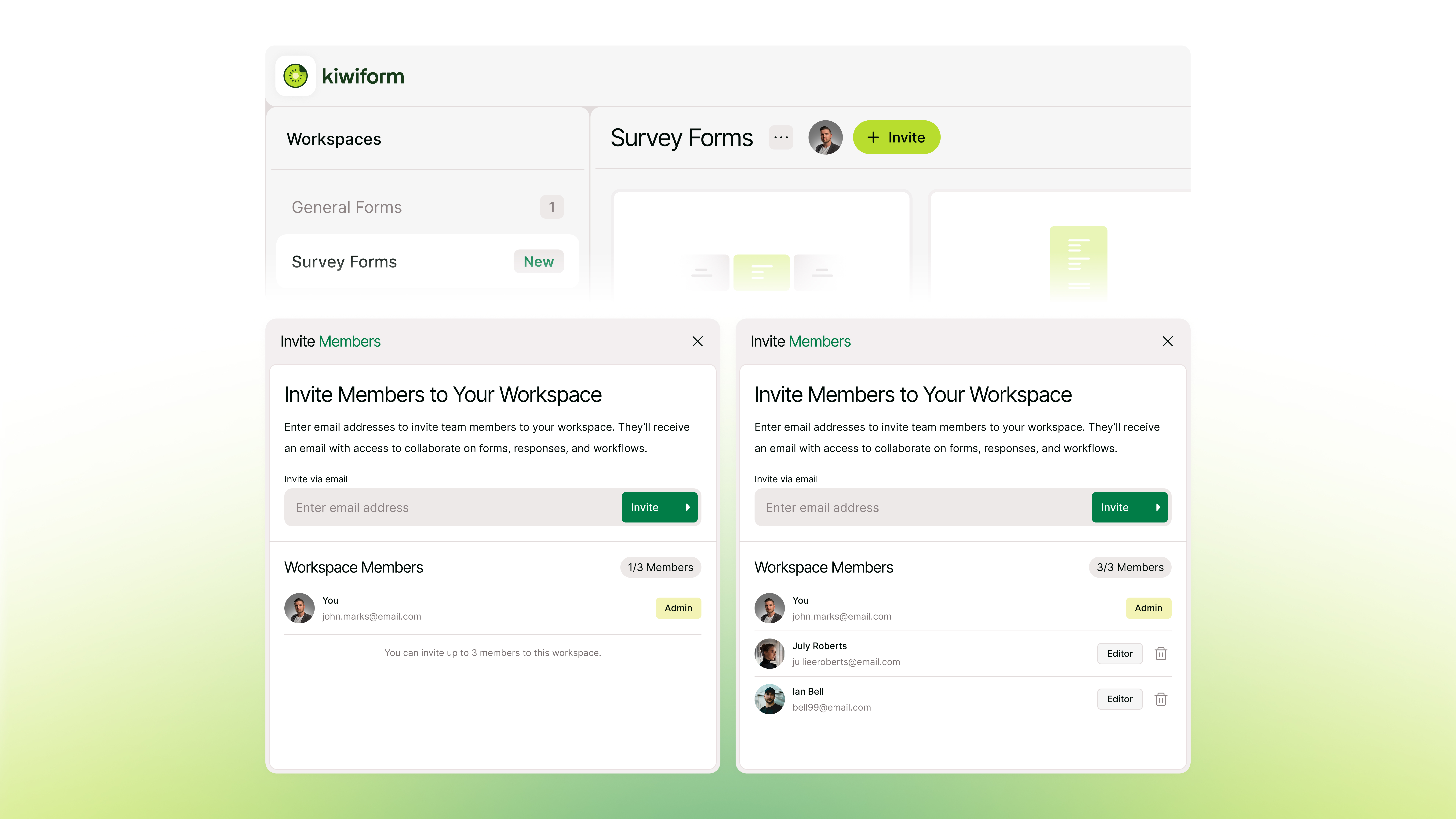
You can now invite members to your workspace using email and collaborate on forms and responses in a shared environment. Instead of working individually, teams can now manage forms together, making it easier to build, review, and operate workflows collaboratively.

Invited users can join instantly using their email. Existing users are added directly to the workspace, while new users can sign up and get access without any additional setup.

With role-based access, you can control who manages the workspace and who contributes to forms and responses, keeping collaboration simple and organized.

This update brings a more flexible and scalable way to use Kiwiform, making it easier for teams to work together and manage form-based workflows efficiently.

Invite your team and start collaborating in your workspace

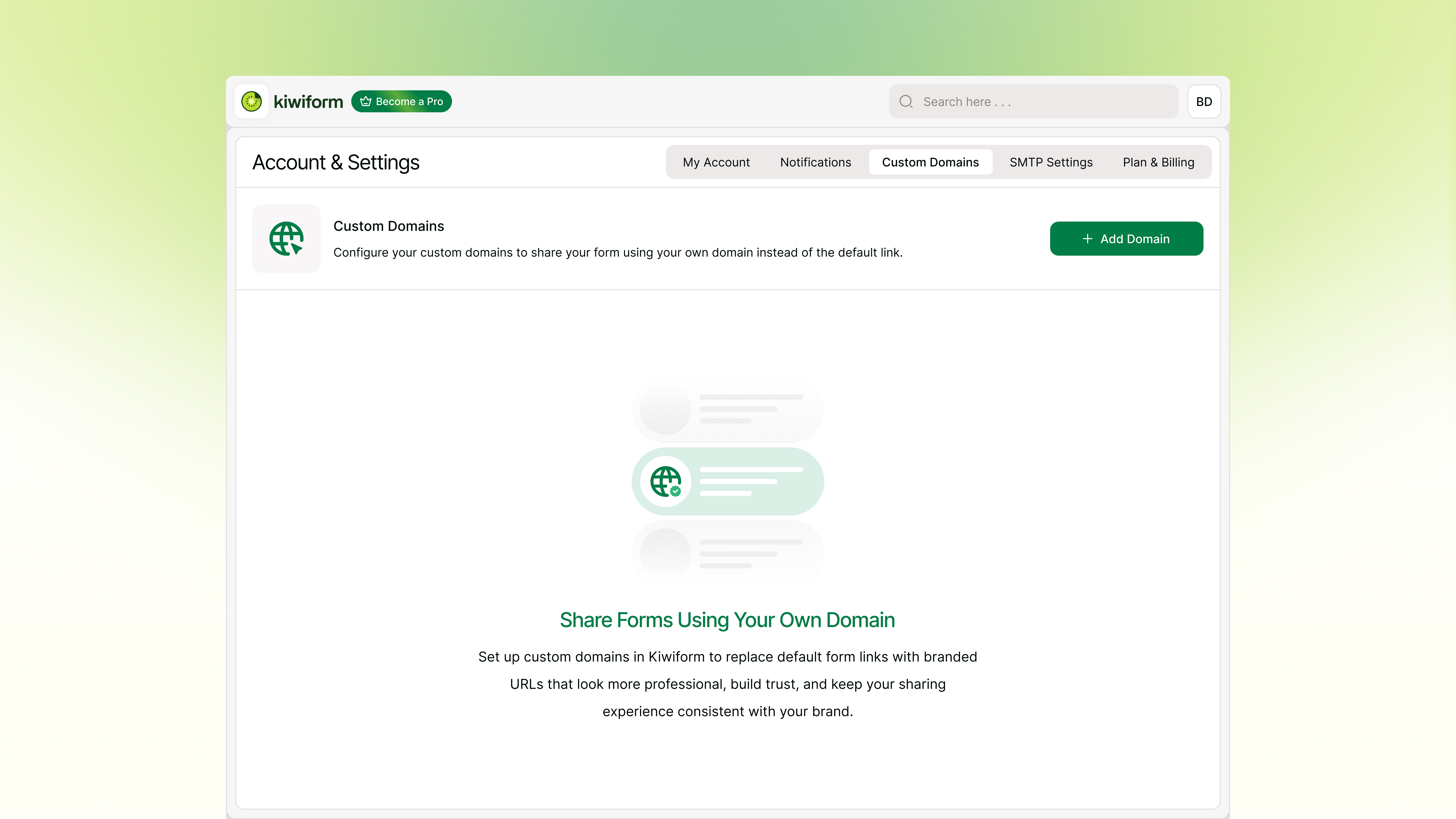
You can now configure custom domains in Kiwiform and use your own branded domain when sharing forms. Instead of default Kiwiform URLs, your forms can now be shared through links that match your own domain and brand.

Once your domain is connected and properly configured, you can assign custom URLs to published forms and manage how your links appear when shared.

Custom Domains help create a more professional, trustworthy, and branded experience for respondents while giving you greater control over how your forms are presented.

Configure your custom domain and start sharing branded form links

kiwizard ai modal image

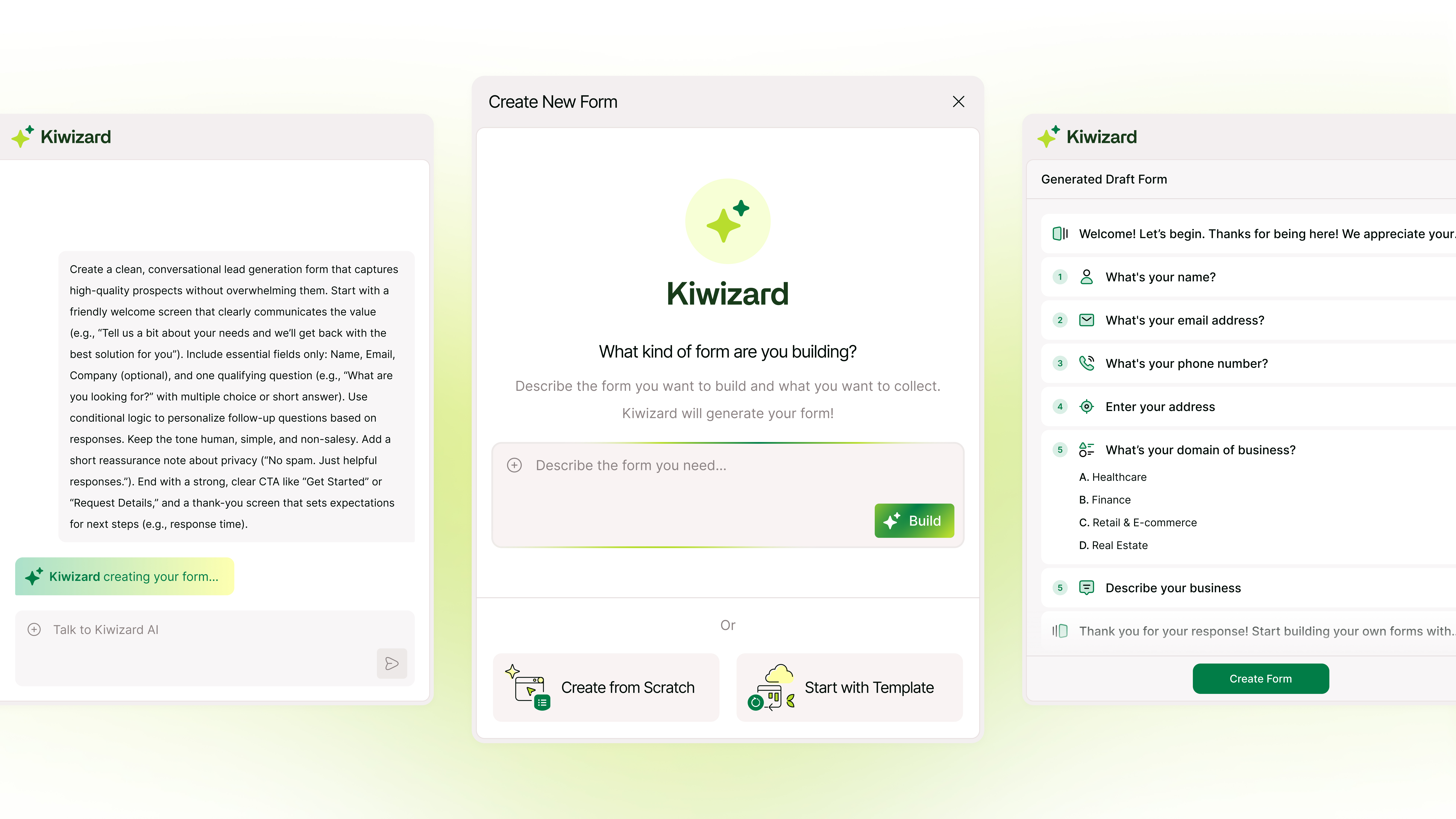
We’ve introduced Kiwizard, the AI Form Builder built into Kiwiform, designed to help you get started faster without the blank canvas. You can now describe the form you want to create, and Kiwizard will generate a structured draft with relevant fields, logical flow, and helpful descriptions.

This update focuses on improving the initial form creation experience by turning ideas into ready-to-edit drafts in seconds. Once generated, you can continue building in the form builder, refine fields, adjust structure, add logic, and customize everything to match your needs.

Kiwizard is designed to assist, not replace, giving you a clear starting point while keeping full control in your hands.

Try Kiwizard and start building your next form faster

pricing life time deal

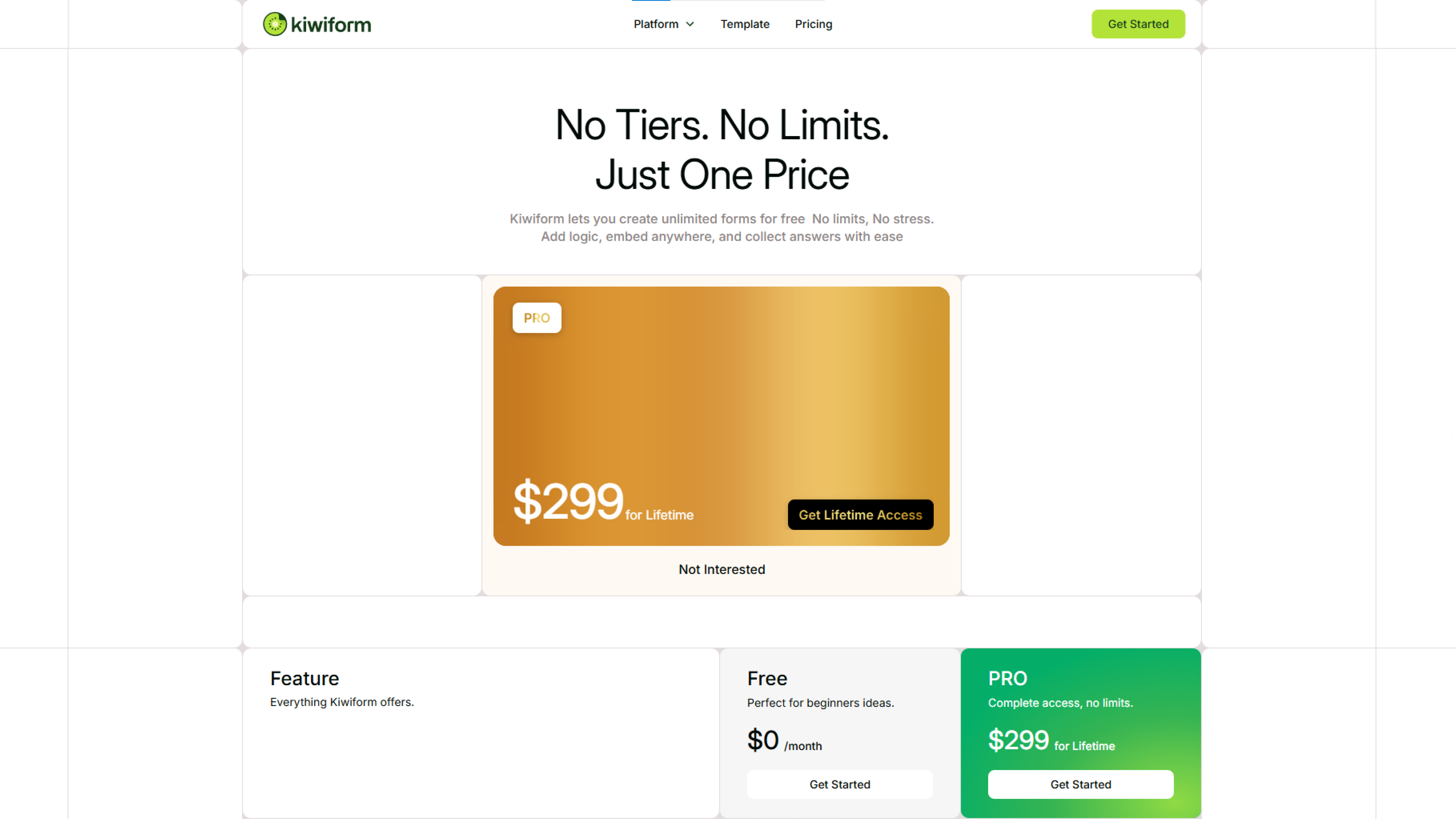
We’ve introduced a new pricing option for users who want long-term access to Kiwiform Pro. You can now claim a limited time lifetime deal and unlock all Pro features with a one-time payment of $299. This option is designed for creators, teams, and businesses who prefer a simple one-time purchase instead of recurring subscriptions. If you’ve been using Kiwiform and want permanent access to advanced features, integrations, and future improvements, you can now upgrade with this special offer.

Claim the Kiwiform Pro Lifetime Deal

dashboard image

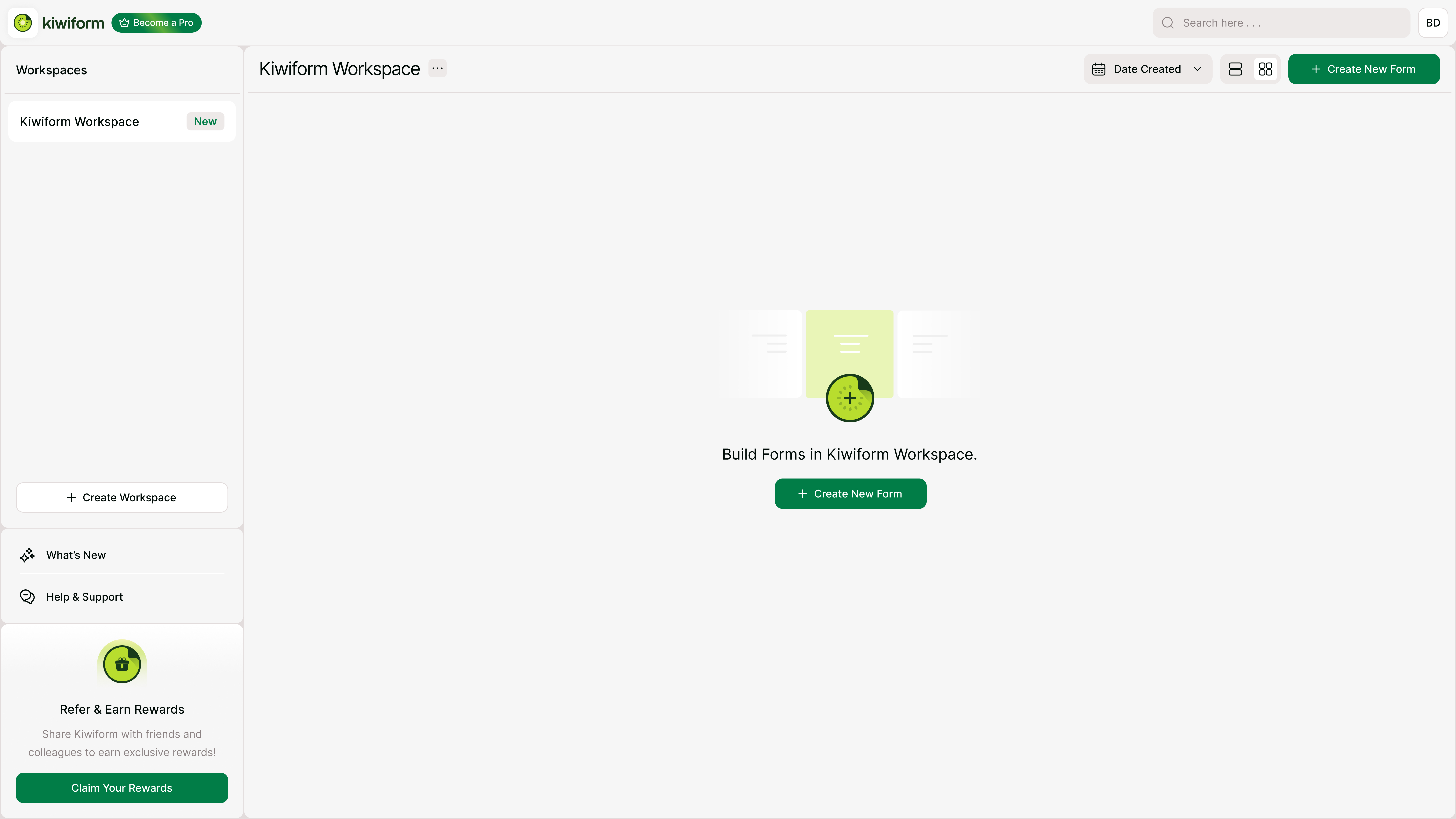
After months of building, testing, and refining, Kiwiform is now available to everyone. Our goal is simple: give you unlimited forms, professional design control, and powerful logic without complicated pricing tiers.


Features in Version 1.0.0

  • Form Builder & Fields

  • Logic & Flow

  • Form Settings

  • Design & Customization

  • Sharing & Publishing

  • Responses & Analytics

  • Integrations

  • Account Management

  • Security


What’s Next

  • More integrations

  • Enhanced analytics

  • Team collaboration improvements

  • Additional design customization options

Frequently Asked Questions

Find quick answers about Kiwiform, forms, integrations, and more.

Yes. Kiwiform lets you create unlimited forms and collect unlimited responses for free.

Yes. Kiwiform is designed to help you collect and manage form data securely, with privacy-focused workflows for creators and respondents.

Kiwiform combines a clean builder, unlimited forms, unlimited responses, logic, themes, integrations, and collaboration-friendly workflows in one simple platform.

Start from scratch, use a template, or ask Kiwizard to generate a form draft. Then customize, publish, and share your form.

Yes. Kiwiform supports integrations and automations such as Webhooks, Google Sheets, Zapier, Dropbox, and more.

Yes. You can customize form design, themes, branding, layouts, and sharing settings so each form fits your brand.